A restaurant cashier that closes the day without arguments.
Every table's bill waits on one screen. Your cashier takes cash, card or both, prints the receipt, and at the end of the shift counts the drawer without seeing what it should hold. Discounts and refunds need a manager's PIN, and every one of them is on the day report.
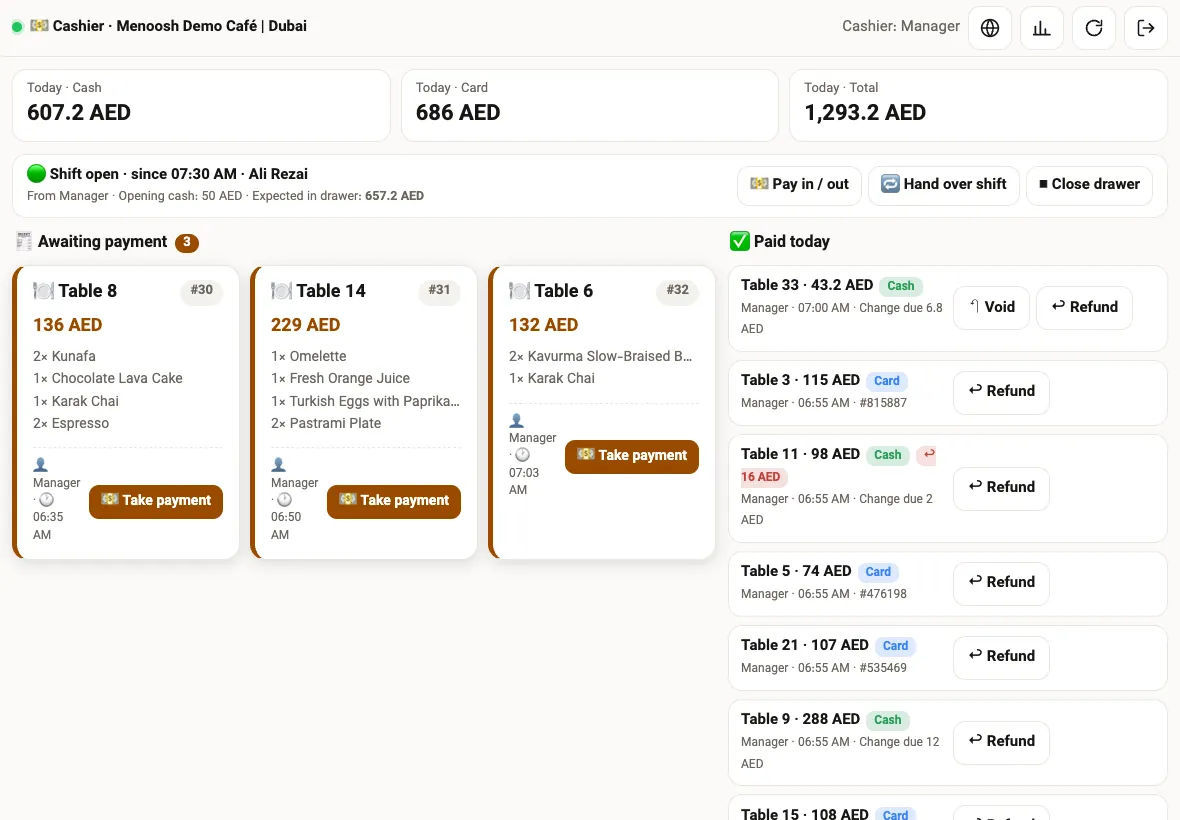
Everything the cashier needs, on one page
Bills arrive at the cashier by themselves. When a waiter sends an order from the tablet, or a guest orders from the QR menu at the table, the bill for that table appears under Awaiting payment with every round of the table added together. Takeaway orders appear the same way.
At the top, the cashier sees today's cash, today's card and the total. Below, the open shift: who opened it, when, how much cash was in the drawer at the start, and how much should be in the drawer right now. On the other side, every payment made today with its method and time.
Item names follow the language of the screen. A dish ordered by a guest in Arabic shows in English on an English cashier screen and in Persian on a Persian one, because the name is taken from your menu, not from the order.
Cash, card, or a bit of both
Tap Take payment on a bill and the payment sheet opens with every item and the total. Choose cash and type what the guest handed over; the change appears straight away. Choose card and type the reference number from your card terminal, so every card payment can be matched with the bank statement later.
Paying half in cash and half by card is one tap: choose Cash + card, type the cash part, and the rest goes on the card. Service charge, if you use one, is added by the rate you set in the panel.
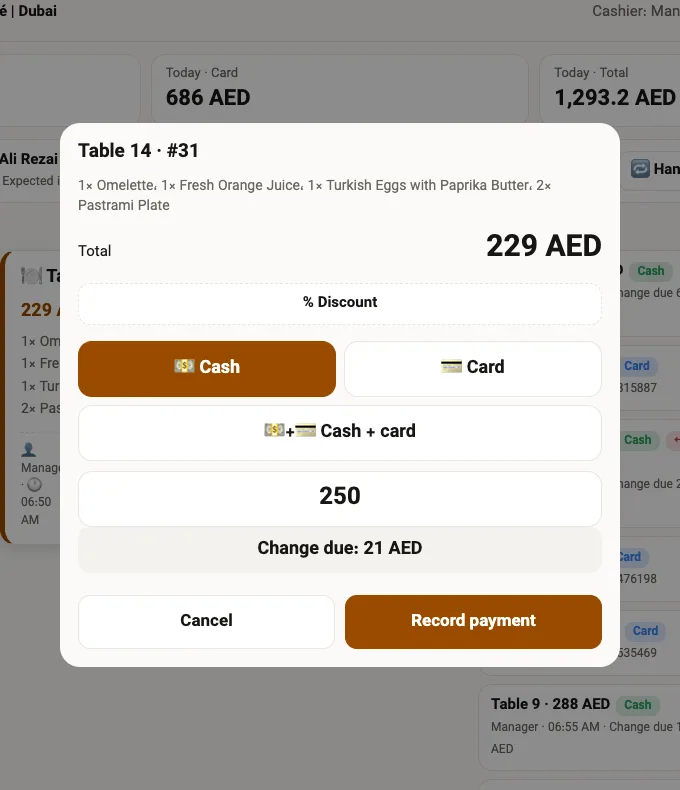
Cash with change
Type the amount received and the change due is shown before you confirm.
Card with reference
The terminal reference is required for card payments, so nothing goes unmatched.
Split payment
Part cash, part card, on the same bill.
Discount with manager PIN
An amount or a percentage, approved by a manager's PIN, and shown on the receipt.
The guest's receipt, on screen and on paper
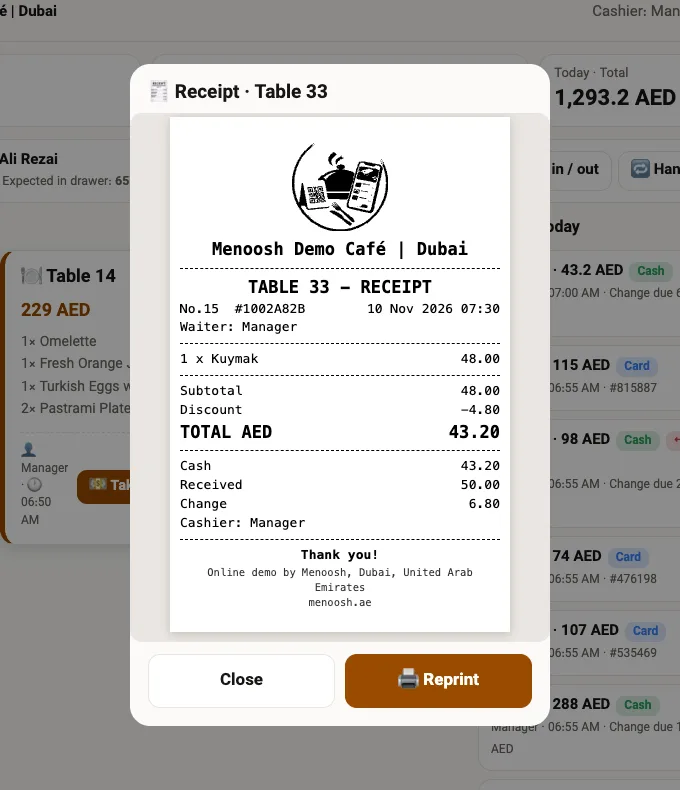
After payment the receipt prints on your receipt printer. Any payment from today can be opened again: tap it and the same receipt the guest received is shown, with the items, the total, the method and the card reference. If the guest asks for another copy, Reprint sends it to the printer.
Voids and refunds, with a reason and a name
If a payment was recorded on the wrong table, Void puts the bill back under Awaiting payment. If a guest is given money back, Refund records the amount, cash or card, the reason and the manager who approved it. The original payment stays in the history; nothing is deleted.
Every void and refund is listed on the day report with the time and the person who did it, so the owner can see at a glance where money left the drawer.
Open, hand over, close — and count blind
The cashier opens the shift with the cash that is in the drawer. Money paid in or taken out during the day, for example change from the bank or a delivery driver's petty cash, is recorded with Pay in / out.
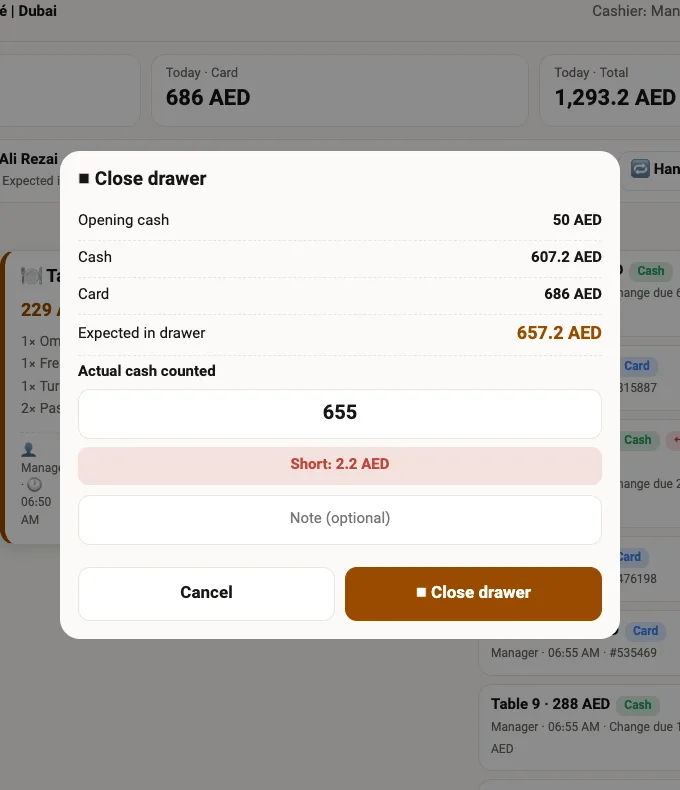
When one cashier leaves and the next one starts, Hand over shift closes the first person's shift and opens the next one in one step. At the end of the day, Close drawer asks for the cash that is actually in the drawer. The expected amount is calculated by Menoosh, and the difference, short or over, is saved with the shift.
One report for the owner
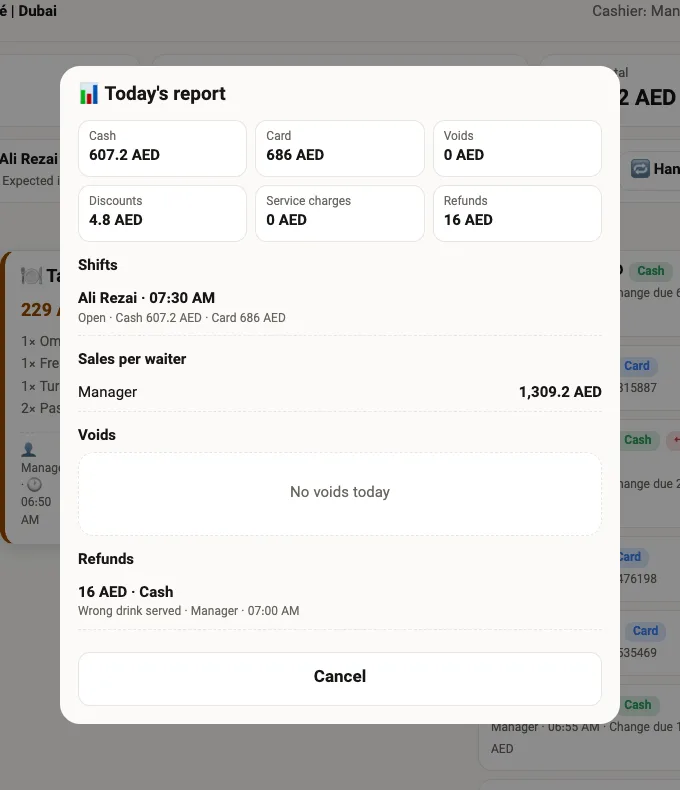
The day report shows today's cash and card, discounts, service charges, refunds and voids, every shift with its totals, and sales by waiter. The owner can open it from the cashier screen or from the restaurant panel without asking anyone for numbers.
Expenses paid from the drawer, such as vegetables bought in the morning, are kept in the panel's income and expense section, so the cash in the drawer and the money spent are seen side by side.
Any tablet, any phone, no extra hardware
Runs in the browser
The cashier opens on any tablet or phone. Nothing to install, nothing to update.
Staff PIN
Each cashier logs in with their own 4-digit PIN, so every payment carries a name. The owner and managers open it without a PIN.
Pair a tablet with a QR code
Scan a QR code from the panel and that tablet becomes the cashier, without anyone's password on it.
Three languages
English, Arabic and Persian. Each cashier picks a language and the tablet remembers it.
Your receipt printer
Receipts print on a network thermal printer, 58 or 80 mm.
Part of the panel
The cashier is also a tab inside the restaurant panel, next to orders, kitchen and reports.
What changes at the counter
Without Menoosh
- Bills written by hand or kept in the waiter's head
- At closing, nobody knows what the drawer should hold
- Discounts given without anyone approving them
- Card slips do not match the day's sales
- The owner calls the cashier to ask how the day went
With Menoosh
- Every table's bill arrives by itself, item by item
- Expected cash is calculated; the shortage is saved
- Every discount and refund carries a manager's PIN
- Every card payment has its terminal reference
- The day report is ready in the panel at any time
Questions restaurant owners ask
Does Menoosh take card payments itself?
No. Menoosh records card payments; the card is charged on your own card terminal or tap-to-pay app. The cashier types the terminal reference so every card payment can be matched later.
Do I need special hardware?
No. Any tablet or phone with a browser works. For printed receipts you need a thermal receipt printer on the same network.
Can more than one cashier work on the same day?
Yes. Each cashier logs in with their own PIN and the shift is handed over from one to the next, each with its own totals.
What happens if a payment was recorded by mistake?
Void puts the bill back as unpaid. Refunds are recorded separately with the amount, the reason and the approving manager. Nothing is deleted.
Who can give a discount?
A cashier can enter a discount, but it needs a manager's PIN, and it appears on the receipt and the day report.
Does it work with orders from the QR menu?
Yes. Orders from the QR menu, the waiter tablet and takeaway all arrive at the same cashier screen.